
How Interactive Floor Plans Help Exhibitors Get Discovered at Trade Shows
Learn how searchable trade show floor plans help exhibitors get discovered, improve attendee navigation, increase sponsor visibility, and give organizers better event map analytics.
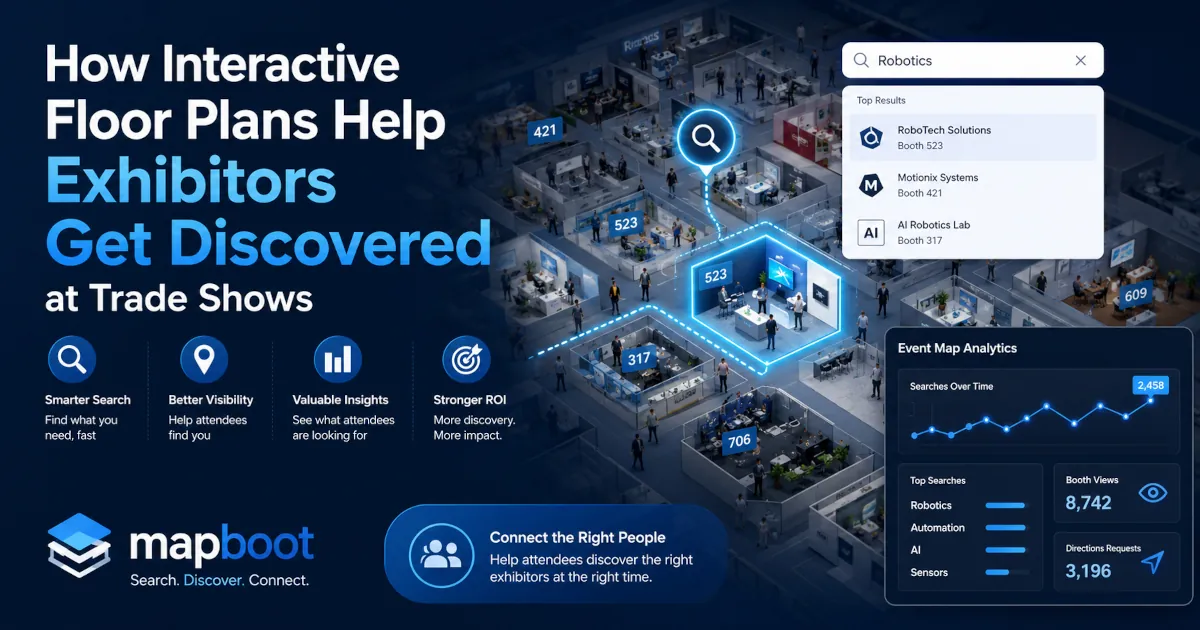
How Interactive Floor Plans Help Exhibitors Get Discovered at Trade Shows
For a long time, the trade show floor plan was treated as a simple event utility. It showed where booths were located. It helped attendees understand the general layout of the expo hall. It gave exhibitors a booth number they could share in emails, brochures, and social posts. That was useful, but it was also limited. Today, attendees expect more. They are not only trying to find booth numbers. They are trying to find companies, products, suppliers, categories, technologies, and solutions that match what they came to the event to discover. That changes the role of the floor plan.
A modern trade show floor plan should not only answer:
Where is booth 421?
It should also help answer:
Which exhibitors should I visit based on what I am looking for?
That is where interactive floor plans become much more valuable. When the map is searchable, mobile-friendly, and connected to exhibitor data, it becomes more than a visual layout. It becomes an exhibitor discovery tool, an attendee navigation tool, and an event analytics layer for organizers. For trade shows and expos, this matters because exhibitor visibility directly affects exhibitor satisfaction, sponsorship value, and future renewals. If your team is still thinking through rollout, the related guide on launching an interactive trade show floor plan without disrupting event operations covers the operational side of getting this kind of map live.
Exhibitor discovery is becoming a bigger part of the event experience
At most large trade shows, attendees do not have enough time to visit every booth. They may walk the main aisles, visit a few familiar brands, stop by scheduled meetings, and explore a few areas that catch their attention. But if the event has hundreds of exhibitors, it is almost impossible for visitors to discover every relevant company by walking the floor alone This is especially true for attendees who arrive with a specific goal.
They may be looking for:
- a supplier
- a product category
- a new technology
- a service provider
- a manufacturing partner
- a sponsor booth
- an educational stage
- a networking area
- a specific exhibitor
If the event floor plan is only a static PDF, the attendee has to manually scan booth names, zoom in and out, or move between the exhibitor list and the map. That experience creates friction. A searchable interactive floor plan removes much of that friction. Instead of forcing attendees to visually inspect the entire floor plan, the map can help them search by exhibitor name, product, category, keyword, or booth number. The relevant booths can be highlighted directly on the map, helping the attendee decide where to go next. That is a major shift. The floor plan is no longer just showing space. It is helping visitors turn intent into action.
Why static trade show floor plans limit exhibitor visibility
Static floor plans are still common, but they have clear limits. A PDF floor plan can show booth locations, aisle numbers, and hall boundaries. It can help someone understand the general layout of the event. But it cannot understand what an attendee is searching for. It cannot show which product categories are getting attention. It cannot tell the organizer which exhibitors were searched most often. It cannot reveal what attendees searched for but could not find. And for exhibitors, that creates a visibility problem. Large brands may already be known before the event starts. Attendees may search for them directly or recognize their name while walking the show floor. Smaller exhibitors do not always have that advantage. A smaller company might offer exactly what an attendee needs, but if the attendee does not already know the company name, the booth can be easy to miss. The exhibitor becomes dependent on booth location, signage, aisle traffic, or chance. An interactive floor plan gives these exhibitors another path to visibility. If the booth profile includes useful keywords, categories, descriptions, and product terms, the exhibitor can appear when an attendee searches for something relevant. That means discovery is no longer limited to who has the biggest booth or the best location. It also depends on how well the exhibitor can be found inside the event map experience.
Search-first floor plans match how attendees actually behave
A trade show attendee usually does not think in terms of booth numbers first. They think in terms of needs. They might search for “robotics,” “packaging equipment,” “AI software,” “sustainable materials,” “food service,” “medical devices,” “logistics,” “machine vision,” “furniture,” or “security.” The problem is that many floor plans are still organized around booth numbers and company names only. That works when the attendee already knows the exhibitor. It does not work as well when the attendee is still discovering who is relevant. A search-first floor plan solves this by connecting the map to richer exhibitor information.
Instead of only indexing booth names, the map can support:
- exhibitor names
- booth numbers
- product keywords
- service keywords
- categories
- descriptions
- sponsor tags
- pavilions
- zones
- halls
- stages and special areas
This makes the trade show map feel closer to a discovery engine. The attendee searches for what they need, and the map shows where to find it. For organizers, this creates a better attendee experience. For exhibitors, it creates more chances to be discovered by the right people.
Booth profiles make the floor plan more useful
A booth shape on a map is not enough. If an attendee clicks on a booth and only sees a company name and booth number, they may still not know whether the exhibitor is relevant. A stronger interactive floor plan should include booth profiles.
A useful exhibitor booth profile can include:
- company name
- logo
- booth number
- short description
- product or service categories
- keywords
- website link
- sponsor status
- pavilion or zone
- call-to-action link
This gives attendees enough context to decide whether they want to visit the booth. It also gives exhibitors a better digital presence inside the event experience. Instead of being just one booth among hundreds, each exhibitor has a searchable profile connected directly to their physical location on the floor plan. This is important because attendees often make decisions quickly. If they can understand what a company does without leaving the map, they are more likely to visit the right booths and spend less time wandering. A better booth profile improves both discovery and navigation.
Better exhibitor metadata creates better search results
The quality of an interactive floor plan depends heavily on the quality of exhibitor metadata. Metadata is the information attached to each exhibitor. It tells the search system what the exhibitor does and when that booth should appear in search results.
For example, an exhibitor may describe itself as an automation company. But attendees may search using different language, such as:
- robotics
- sensors
- conveyors
- motion control
- industrial automation
- machine vision
- warehouse automation
If the exhibitor profile only includes the company name, the booth may not appear for those searches. But if the profile includes useful keywords and categories, the exhibitor becomes easier to discover. This is one of the reasons Mapboot supports exhibitor metadata submission. The organizer can collect richer information from exhibitors, then use that data to improve the event map experience. The result is a floor plan that is not only accurate visually, but also useful as a search and discovery tool. A clean map helps attendees see the space. Good metadata helps attendees understand who is inside that space.
Interactive floor plans can increase sponsor visibility
Sponsors often pay for visibility, but sponsor visibility can be hard to measure. A sponsor logo on a sign or banner may be valuable, but it is difficult to know how many attendees noticed it or interacted with it. A logo in a static PDF may be seen by some visitors, but there is little behavioral data behind it. Interactive floor plans can make sponsor visibility more measurable.
Sponsors can be highlighted inside the map experience through:
- featured booth profiles
- sponsored zones
- highlighted pins
- category placements
- search result visibility
- sponsor filters
- branded areas
- map callouts
More importantly, organizers can begin to understand how visitors interact with sponsor locations. For example, the event team may be able to see whether attendees searched for sponsor-related terms, selected sponsor booths, opened sponsor profiles, or requested directions to sponsor locations. This gives organizers a stronger sponsorship story. Instead of only offering logo placement, the event can offer visibility inside a tool attendees actively use to search, navigate, and discover exhibitors. That makes the floor plan more valuable as part of the overall sponsorship package.
Event map analytics help organizers understand attendee search behavior
One of the biggest advantages of an interactive floor plan is that it can create useful analytics. A static map shows the layout, but it does not tell the organizer what attendees did with it.
A searchable event map can reveal behavior such as:
- what attendees searched for
- which exhibitors appeared in search results
- which booths were selected
- which categories received the most attention
- which locations received direction requests
- which sponsor areas were viewed
- which searches returned no results
This is valuable because it gives organizers a clearer view of attendee intent. Attendee intent is different from simple traffic. It shows what visitors were actively trying to find. For example, if many attendees search for “AI,” “automation,” “coffee equipment,” or “sustainable packaging,” that tells the organizer something about demand. If many people search for a category and get no results, that also tells the organizer something important. These insights can help with future exhibitor recruitment, category planning, sponsorship strategy, floor plan design, and attendee experience improvements. The floor plan becomes a source of event intelligence. For a deeper look at what those signals can show after launch, read the Mapboot guide to trade show attendee discovery analytics.
No-result searches reveal missed opportunities
No-result searches are one of the most useful signals in event map analytics. A no-result search happens when an attendee searches for something and the map does not return a match. At first, this may look like a small search issue. But for an event organizer, it can be a very useful insight.
No-result searches can reveal:
- missing exhibitor keywords
- incomplete exhibitor profiles
- categories attendees expected to find
- products or services not represented at the event
- confusing terminology
- future sponsorship opportunities
- future exhibitor recruitment opportunities
For example, if attendees repeatedly search for “3D printing” and no results appear, there are a few possible explanations. Maybe the event has 3D printing exhibitors, but their metadata is incomplete. Maybe those companies are categorized under different terms. Or maybe the event does not have enough exhibitors in that category. Either way, the organizer learns something. Without search analytics, that demand stays invisible. With interactive floor plan analytics, the event team can see what attendees wanted but could not easily find. That is useful for improving both the current event and future editions.
Route requests can show stronger visitor intent
Search is useful because it shows interest. But route requests can show even stronger intent. If an attendee searches for an exhibitor and then asks for directions to that booth, that is a meaningful action. It suggests the attendee may be seriously considering a visit. For exhibitors, this type of data can be valuable. It gives them more than a listing on a map. It helps show whether attendees engaged with their booth location digitally. For organizers, route requests can help reveal which areas of the floor plan generated more navigation demand. This can support better post-event reporting. Instead of only saying that an exhibitor was included in the floor plan, the organizer can provide more context around how visitors interacted with the exhibitor inside the map. That does not replace lead retrieval or booth scans, but it adds another useful layer of visibility. It helps connect attendee search behavior with physical movement inside the event.
Interactive floor plans improve the attendee experience before and during the event
A good trade show floor plan is useful before the event begins. Attendees can explore the map, search exhibitors, find categories, plan routes, and decide which booths they want to visit. This helps them arrive with a clearer plan. During the event, the map becomes even more practical. Attendees can open the floor plan in the browser, search for exhibitors, highlight booths, find nearby areas, and understand where they are going without downloading a separate app. That browser-based experience matters. Many attendees do not want to download a full event app just to find a booth. They want a fast map that opens from a link, QR code, event website, email, or exhibitor page. An interactive floor plan should reduce friction. It should help visitors find what they need quickly, especially on mobile. For large events, this can make the difference between a visitor feeling lost and a visitor feeling in control of their time.
Why organizers should care about exhibitor discovery
Exhibitor discovery is not only an exhibitor problem. It is an organizer problem. Exhibitors invest serious money into trade shows. They pay for booth space, travel, staff, displays, sponsorships, marketing materials, and time away from their normal operations. After the event, they want to know whether the investment was worth it. If exhibitors feel hidden or difficult to find, satisfaction drops. If they believe attendees could not easily discover their booth, they may question whether to return the next year. A better floor plan cannot solve every exhibitor ROI problem, but it can improve one important part of the experience: visibility. When attendees can search by product, service, category, and keyword, exhibitors have more ways to be discovered. When organizers can show search behavior, booth selections, route requests, sponsor engagement, and no-result searches, they have a better story to tell after the event. That matters for exhibitor retention. It also matters for sponsorship sales, event planning, and the overall perception of the event’s professionalism.
What a strong trade show floor plan should include
A strong interactive trade show floor plan should do more than display booth shapes. It should support discovery, navigation, and analytics.
Important features include:
- searchable exhibitor names
- booth numbers
- product and service keywords
- exhibitor categories
- booth profile cards
- company descriptions
- sponsor highlights
- category filters
- booth highlighting
- mobile-friendly access
- browser-based viewing
- QR code access
- hall, entrance, and landmark references
- route and direction support
- attendee search analytics
- no-result search reporting
- exhibitor-level engagement insights
The goal is not to make the map complicated. The goal is to make it more useful.
An attendee should be able to quickly answer:
Who should I visit, where are they located, and how do I get there?
An organizer should be able to answer:
What were attendees searching for, which exhibitors were discovered, and where did the event experience create value?
That is the real difference between a basic floor plan and an intelligent event map.
How Mapboot supports exhibitor discovery
Mapboot is built for searchable, browser-based interactive floor plans. For attendees, Mapboot helps turn the event map into a discovery experience. Visitors can search for exhibitors, products, services, categories, and relevant terms directly inside the floor plan. Matching booths can be highlighted on the map, helping visitors understand where to go next. For exhibitors, Mapboot creates a better opportunity to be found. Instead of relying only on booth location or brand recognition, exhibitors can be discovered through their profile data, keywords, categories, and booth information. For organizers, Mapboot adds an analytics layer to the floor plan. Event teams can better understand attendee search behavior, exhibitor discovery, sponsor visibility, route requests, and no-result searches. That makes the floor plan more useful before, during, and after the event. If you are comparing map platforms while planning this, the Mapboot vs Map Your Show comparison explains how the attendee-facing map experience differs from a broader event platform workflow. Mapboot is not just a way to display booths. It is a way to help attendees discover exhibitors and help organizers understand what visitors were looking for.
Final thought: the future of the floor plan is discovery
Trade show floor plans are changing. The old version of the floor plan was mainly a diagram. It helped people see where booths were located. The modern version needs to do more. It needs to help attendees search, compare, navigate, and discover. It needs to help exhibitors become more visible. It needs to help sponsors show value. And it needs to help organizers understand what visitors were trying to find. That is why interactive floor plans are becoming more important for trade shows, expos, and large events. A static floor plan can show where booths are located. A searchable interactive floor plan can help visitors decide which booths matter to them. For events that depend on exhibitor satisfaction and attendee experience, that difference is important. The future of the trade show floor plan is not only navigation. It is discovery.