
Building the Automate 2026 Interactive Trade Show Map
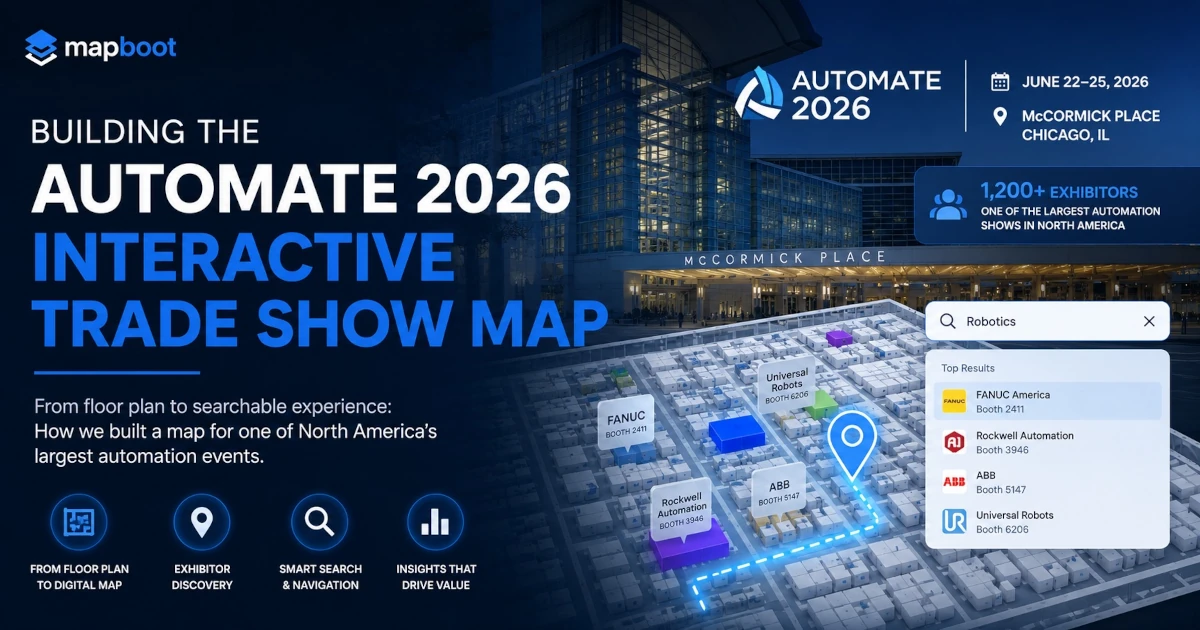
A behind-the-scenes look at how Mapboot built a searchable interactive floor plan demo for Automate 2026 at McCormick Place in Chicago.
Building the Automate 2026 Interactive Trade Show Map
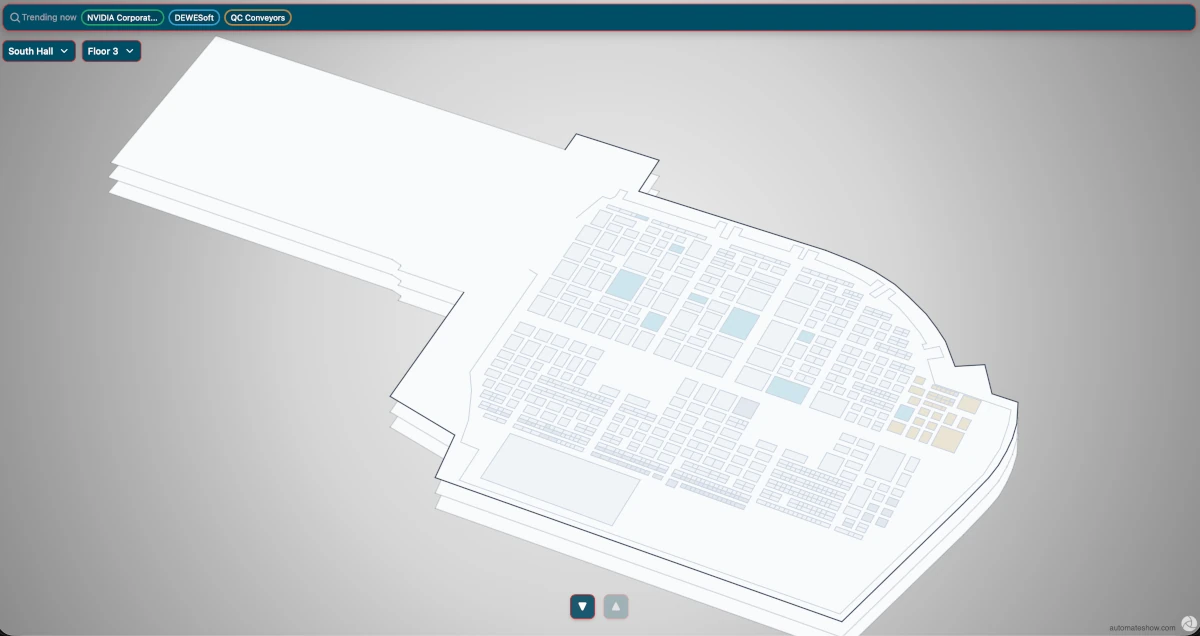
Automate 2026 is scheduled to take place at McCormick Place in Chicago from June 22 to June 25, 2026. For a show built around robotics, automation, industrial technology, motion control, machine vision, and manufacturing innovation, the floor plan is not just a layout. It is part of the visitor experience. We chose to build the Automate 2026 map as a capabilities confirmation for Mapboot. Automate 2026 is a huge trade show with more than 1,200 exhibitors, making it one of the largest automation and manufacturing technology events in North America. That scale made it a strong test case. If a searchable interactive floor plan can support an event this large, with a dense exhibitor list and a technical audience, it can support many other trade shows, expos, and convention center events. Large technical trade shows create a very specific navigation problem. Attendees often arrive with a goal in mind. They are not only trying to find a booth number. They may be looking for robotics companies, AI solutions, automation suppliers, machine vision systems, sensors, integrators, packaging equipment, or a specific exhibitor they saw before the show. That is why we built an Automate 2026 interactive map demo with Mapboot. The goal was simple: take a standard trade show floor plan and turn it into a searchable browser-based event map where visitors can find exhibitors faster, understand the layout more clearly, and explore the show floor without needing to download an app. You can view the live Automate 2026 map demo here: Automate 2026 Map Demo.

Why we selected Automate 2026 as a test case
Automate 2026 was not selected randomly. For Mapboot, we wanted to test the product against a real-world show floor that would expose the same challenges event teams face at large trade shows: a dense floor plan, a large exhibitor base, many categories, and a visitor audience that searches by need instead of only by company name. A small event map can be useful, but it does not prove enough. A large trade show map forces the system to handle scale. With more than 1,200 exhibitors, Automate 2026 gave us a clear way to test whether the map experience could stay useful when the floor plan becomes crowded and the exhibitor list becomes difficult to browse manually.
This mattered because a show of that size creates several practical questions:
- Can attendees find exhibitors quickly without scanning the whole floor plan?
- Can booths be organized in a way that still feels readable?
- Can the map support search by category, product, keyword, and company name?
- Can the visitor experience work in the browser without forcing an app download?
- Can the map create a stronger discovery layer on top of a standard floor plan?
Those are the exact problems Mapboot is designed to solve.
Why Automate 2026 was a good map-building challenge
Automate is the type of show where a static floor plan can quickly become difficult to use. The event is large, the exhibitor list is technical, and many attendees are searching by product category or business need rather than by company name alone. Someone walking the floor may not know every exhibitor in advance, but they may know exactly what they are trying to find. That creates an opportunity for a better floor plan experience.
A searchable trade show floor plan should help attendees answer questions like:
- Where is this exhibitor located?
- Which companies are related to robotics, AI, vision systems, or motion control?
- What booths match a specific product category?
- Which exhibitors should I visit first?
- How do I understand the show floor without scanning the entire PDF?
For organizers and exhibitors, the opportunity goes beyond navigation. A digital event map can also show what visitors search for, which categories receive attention, and where demand appears across the show floor. This is the difference between a map that only displays booths and a map that supports exhibitor discovery.
Step 1: Starting with the floor plan
The first step was reviewing the Automate 2026 floor plan and understanding the structure of the show. At this stage, the goal was not to build anything yet. The goal was to study the source material carefully.
A trade show floor plan can look simple from a distance, but there are usually many details that matter once the map becomes interactive:
- booth blocks
- booth numbers
- aisle paths
- hall boundaries
- entrances
- connection points
- large open areas
- sponsor or feature areas
- navigation routes
- areas that should not be treated as walkable space
This first review is important because the digital map has to respect the real structure of the floor plan. If the booth layout is misunderstood at the beginning, every later step becomes harder.
The floor plan became the base reference for the rest of the process. From there, the work moved into map structure, tracing, booth organization, and interactive behavior.
Step 2: Defining the map structure
Before drawing booths or adding search data, the map needed a clean structure. In Mapboot, this means setting up the event map around its physical organization. For a simple event, that may be one building and one floor. For a larger venue or connected show environment, the structure can include multiple buildings, halls, and levels. For Automate 2026, the structure had to support a large show floor experience at McCormick Place. The map needed to feel organized enough for visitors while still keeping the interaction simple.
This step usually includes:
- creating the map record
- defining the building or hall structure
- adding floors or layers
- uploading the floor plan image or PDF
- aligning the visual reference
- preparing the map for booth tracing
This part is not flashy, but it matters. A clean structure makes the final interactive map easier to maintain, easier to search, and easier to expand later.
Step 3: Bringing the floor plan into the editor
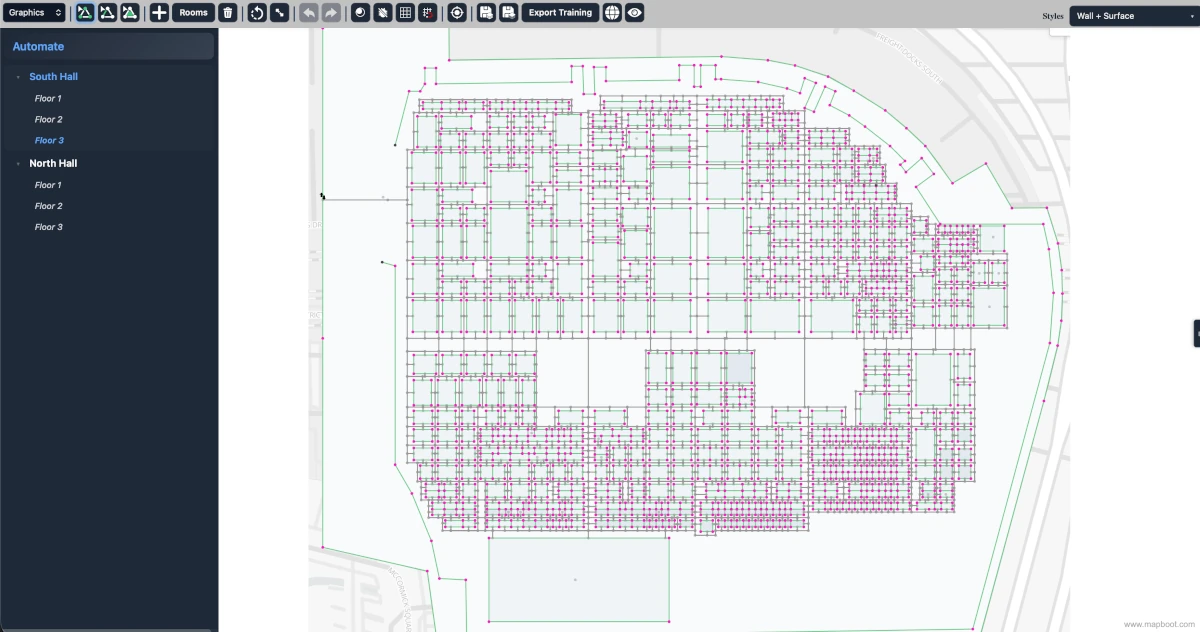
Once the structure was ready, the floor plan was loaded into the Mapboot editor. This is where the map starts becoming more than an image. The original floor plan acts as a reference layer. The interactive parts are then built on top of it. Booths, walkable paths, highlighted areas, labels, and locations have to be created in a way that matches the visual plan but also works inside the browser map. A static PDF can be viewed, but it cannot be searched intelligently. It cannot highlight matching exhibitors. It cannot provide booth-level interaction. It cannot show analytics. The editor is where the static plan begins to turn into a usable digital map.
Step 4: Tracing the booth layout
After the floor plan was placed in the editor, the next step was booth tracing. This is one of the most important parts of building an interactive trade show map. Every booth that should be clickable or searchable needs to become a real map object, not just a shape in the background image. For Automate 2026, the booth layout was dense. That means precision mattered. The map needed to keep booth boundaries clean, preserve the overall shape of the show floor, and make sure the booth areas were easy to highlight when a visitor searches for an exhibitor or category.
This step usually includes:
- outlining booth blocks
- creating individual booth polygons
- checking spacing and alignment
- preserving aisle visibility
- making sure booth shapes are not overlapping incorrectly
- preparing each booth to receive exhibitor data
Booth tracing is where the map begins to feel interactive. Once a booth exists as a real object, it can be selected, styled, searched, linked, and connected to exhibitor metadata.
Step 5: Building the navigation layer
A good interactive event map should not only show where booths are located. It should also help visitors understand how to move through the space. That means the map needs a navigation layer. For a trade show floor plan, the navigation layer is usually based on aisles, entrances, open walking areas, and connections between booth zones. The challenge is to make the routes feel natural. Visitors should not be routed through booths, blocked areas, or spaces that would not make sense on the actual show floor. For Automate 2026, the navigation layer had to support a large industrial event environment where attendees may move between many categories and exhibitor zones.
This step includes:
- identifying main aisles
- adding walkable paths
- connecting booth areas to nearby aisles
- preserving clear route flow
- avoiding booth interiors as walkable space
- checking that routes make sense visually
The goal is not to overcomplicate the map. The goal is to make the map useful when someone needs to find a booth quickly.
Step 6: Adding exhibitor discovery data
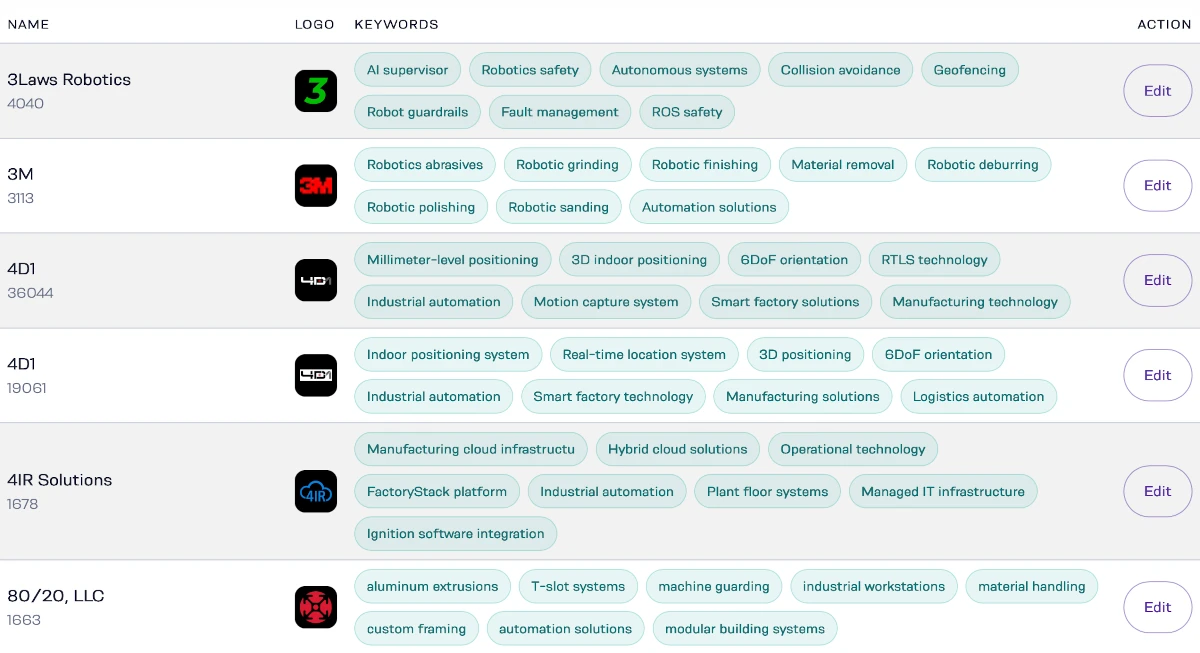
The next step was connecting the map to exhibitor discovery. This is where Mapboot becomes different from a basic digital floor plan. The map is not only about booth geometry. It is also about what people can find. For a show like Automate 2026, attendees may search for company names, but they may also search for technical categories and product terms. That is why exhibitor metadata matters.
Useful exhibitor metadata can include:
- company name
- booth number
- logo
- website
- product category
- service category
- description
- keywords
- sponsor status
- industry focus
This metadata helps the map understand what each exhibitor represents. For example, a company may be relevant to robotics, but visitors may also search for automation, motion control, machine vision, sensors, or AI. If the exhibitor profile only includes a company name, many useful searches may fail. If the profile includes stronger metadata, the exhibitor becomes easier to discover. That is the real value of a search-first trade show floor plan. It helps attendees find exhibitors based on what they need, not only based on who they already know.
Step 7: Testing search behavior
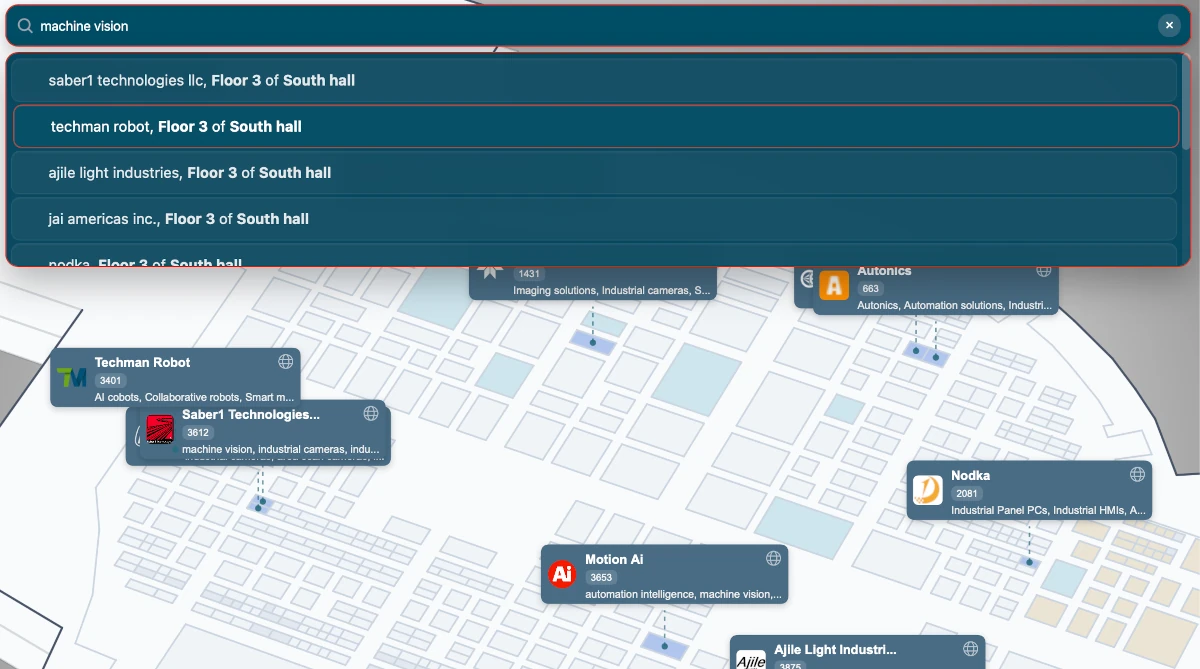
After booths and exhibitor data were connected, the map had to be tested from an attendee point of view. This means searching the map the way a real visitor might search it.
For a technical event like Automate, test searches may include terms like:
- robotics
- automation
- AI
- machine vision
- sensors
- motion control
- packaging
- software
- integrators
- industrial systems
The purpose of this step is to check whether the map returns useful results. If a search term is relevant but does not return good results, the issue may not be the map itself. It may be the metadata. This is why search testing is part of the map-building process. A good interactive floor plan does not only need clean booth shapes. It needs search behavior that feels useful to attendees.
Step 8: Designing the visitor experience
Once the core map was working, the next step was reviewing the visitor experience. For event maps, small details matter. Visitors may open the map from a phone, a laptop, a QR code, a website link, or an exhibitor page. The experience needs to be fast and simple. Most attendees will not spend time learning how a map works. They expect to search, tap, zoom, and understand the result quickly.
For the Automate 2026 demo, the visitor experience focused on:
- fast browser access
- clear search input
- booth highlighting
- readable booth numbers
- smooth zooming
- simple visual hierarchy
- exhibitor discovery
- route and location clarity
- no app download requirement
This is an important point for trade shows. A full event app may be useful for some attendees, but many visitors just want the map. A browser-based interactive floor plan reduces friction because it can be opened directly from a link. That makes it easier to place the map on an event website, landing page, email, QR code, or exhibitor resource page.
Step 9: Preparing the public demo page
The map also needed a public-facing page that explains the project. That is why we created the Automate 2026 map demo page on Mapboot. The page gives context around the map, the event, and how a searchable floor plan can support a large show environment. You can view the page here: Automate 2026 Map Demo. This page is useful because it separates the map experience from a normal blog post. The blog explains the process. The demo page shows the result. For event organizers, that is usually the easiest way to understand the product. They do not only want a list of features. They want to see how the map would actually feel for a real show.
Step 10: Reviewing the final interactive map
The final step was reviewing the full map as a finished product.
This means checking the map from both sides:
The attendee side:
- Can visitors search easily?
- Are booth results clear?
- Is the map readable?
- Does the layout make sense?
- Can someone understand where they are going?
The organizer side:
- Is the map structured correctly?
- Are booths and locations organized cleanly?
- Can metadata be expanded later?
- Can the map support exhibitor discovery?
- Can analytics provide useful insight after launch?
For Mapboot, the final product is not just a polished floor plan. It is a working discovery layer. The Automate 2026 demo shows how a large show floor can become searchable, interactive, and more useful for attendees before and during the event.
What we learned from building the Automate 2026 map
Building this demo reinforced a few important ideas about trade show maps. First, the floor plan is only the starting point. A PDF can show the layout, but it does not create discovery on its own. Second, booth accuracy matters. If the booth structure is messy, the map experience will feel weak, even if the design looks good. Third, metadata matters just as much as geometry. A booth without searchable information is still hard to discover. Fourth, large trade shows need search. When there are hundreds or thousands of exhibitors, visitors cannot rely only on walking the aisles. Finally, the map should serve more than one audience. Attendees need navigation and discovery. Exhibitors need visibility. Organizers need insight. A strong interactive floor plan can support all three.
Why this matters for trade show organizers
For event organizers, a floor plan is often treated as an operational requirement. It has to exist. It has to show booths. It has to help people understand the hall. But for large trade shows, the floor plan can do much more.
A searchable interactive floor plan can help:
- attendees find relevant exhibitors faster
- exhibitors get discovered by product or category
- sponsors receive more visible placement
- organizers understand search behavior
- event teams identify no-result searches
- future events improve exhibitor categories and floor planning
This is especially valuable for technical shows where attendees often search by solution, not just by exhibitor name. An attendee may not know which company provides a specific automation component. But if they can search by product or category, the map can guide them toward relevant booths. That turns the floor plan into a discovery tool.
From static floor plan to searchable event map
The Automate 2026 map started as a floor plan reference. It became a structured map with booths, paths, search, metadata, and a browser-based visitor experience. That transformation is the core idea behind Mapboot. A trade show floor plan should not only help visitors avoid getting lost. It should help them find what they came to the event to discover. For a show like Automate 2026, that means making it easier to search across exhibitors, categories, products, and technical terms. It means helping attendees move through a large show floor with more confidence. It also means giving organizers a better understanding of what visitors are looking for. That is where interactive floor plans become more than a digital version of a PDF. They become part of the event experience.
See the Automate 2026 interactive map demo
We built the Automate 2026 demo to show how a large trade show floor plan can become searchable, interactive, and easier to use in the browser. View the demo here: Automate 2026 Map Demo. If your event team is working with a static floor plan, PDF map, or exhibitor list, Mapboot can help turn it into a searchable interactive floor plan that supports attendee discovery, exhibitor visibility, and event map analytics.